


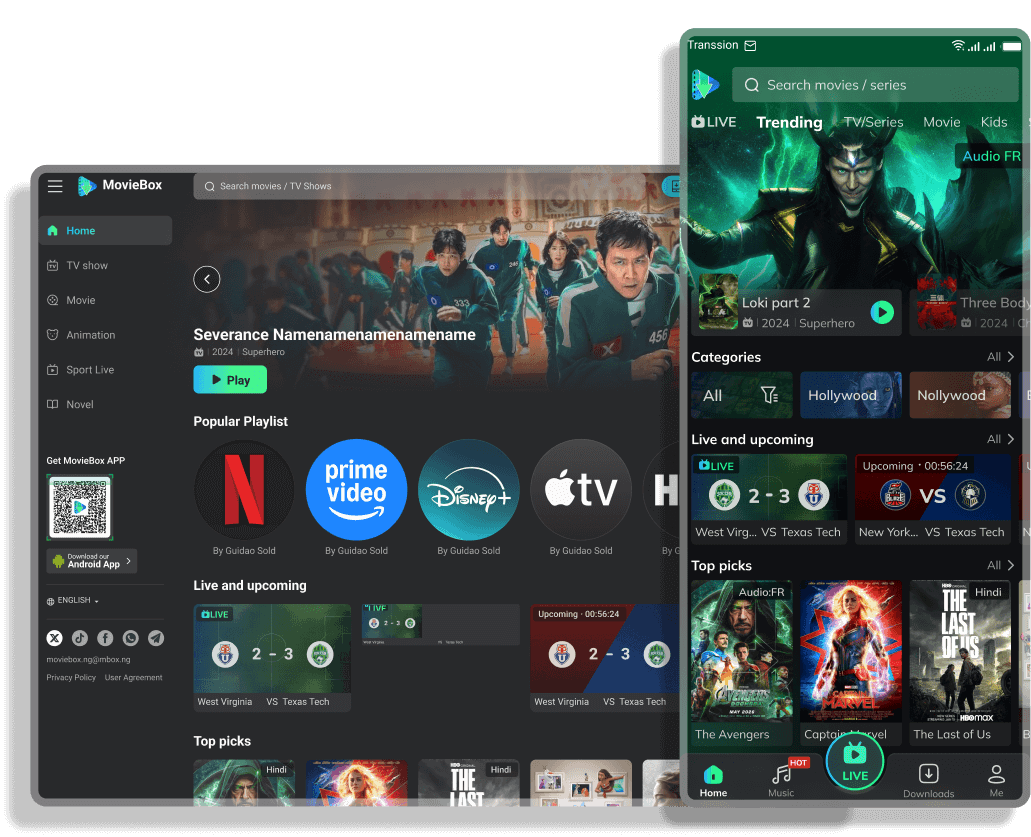
Download & Install MovieBox
MovieBox is available on multiple platforms including PC, Android phones and iPhones, so you can watch movies and TV shows anywhere, and completely free.

 Download MovieBox App
Content

- How to Download MovieBox on PC & iPhone
- How to Download MovieBox on Android
- Is MovieBox Free?
- Pros & Cons of MovieBox
- Join MovieBox Users Around the World
How to Download MovieBox on PC & iPhone
Using the MovieBox website, you can easily and conveniently watch your favorite movies and shows on your PC, Mac, or iPhone. Just remember, you don't have to sign up or install anything; just follow the steps below and you'll be able to watch for free on the MovieBox website.
Use MovieBox on your PC or iPhone
Step 1: Visit the site
Open one of our official MovieBox websites in your browser. (for eg - https://moviebox.ph) iPhone users can open the website in Chrome or Safari.
Step 2: Search
Type the name of the movie, show, or anime you want to watch in the search bar.
Step 3: Watch online
Click on "Watch Now" and start enjoying watching movies and TV shows, from HD to 4K for free.
Step 4: Bookmark the website
Click the "Star" icon on the address abr and choose "Done" to bookmark the MovieBox website for quick access anytime.
How to Download MovieBox on Android
MovieBox is fully available for Android users through our official APK for free. With the MovieBox Android app, you can watch movies, TV shows, anime, live sports, and music anywhere, anytime for free. Below, you'll find the steps to download and install the MovieBox APK on Android phones.
Download & Install MovieBox App
Step 1: Download the MovieBox APK
Simply click on "Download App" below to download the MovieBox app or simply scan the QR code from your phone to download the MovieBox app for free.
Note: Make sure to download the MovieBox APK only from official MovieBox websites to stay safe.
Step 2: Enable Installation from Unknown Sources
Go to your phone's "Setting" and search for "Install unknown apps" in the search bar. Find "Chrome", open it and enable the "Allow from this source".
Step 3: Install the MovieBox App
Find the downloaded APK in the "Downloads" folder, tap on it and install the MovieBox for free.
Step 4: Bookmark the website
Click the "Star" icon on the address abr and choose "Done" to bookmark the MovieBox website for quick access anytime.
Is MovieBox Free?
Yes, it's totally free and safe to use. You read it right, MovieBox is completely free. You can watch the latest movies, shows, anime, live sports, and music without paying anything and you can also download thousands of movies and shows for free. To support the platform, MovieBox shows a few ads but they are minimal and never disturb your watching experience.
For users who want an even better experience, we also offer a premium plan with extra benefits like unlimited downloads, ad-free watching, and faster updates.
Pros & Cons of MovieBox
Let's understand the pros (advantages) of watching movies and shows on MovieBox. This is why we say it's one of best platforms where you can enjoy watching your favourite movies and shows absolutely free.
Pros
'%3e%3cpath%20d='M22.9246%208.10504C21.7279%205.24156%2019.4649%202.95545%2016.6137%201.72977C15.1536%201.11154%2013.5842%200.792969%2011.9986%200.792969C10.413%200.792969%208.84361%201.11154%207.38352%201.72977C5.97273%202.33291%204.69263%203.20453%203.61443%204.29613C1.38309%206.55061%200.13489%209.59669%200.142614%2012.7687C0.138217%2015.1152%200.821899%2017.4116%202.10907%2019.3736C3.39623%2021.3356%205.2304%2022.8772%207.38461%2023.8076C8.84365%2024.4302%2010.4139%2024.7499%2012.0002%2024.7474C13.5604%2024.7499%2015.1054%2024.4409%2016.5447%2023.8386C17.9839%2023.2362%2019.2884%2022.3526%2020.3817%2021.2396C21.4693%2020.1487%2022.3333%2018.856%2022.9241%2017.4334C23.5403%2015.9556%2023.8576%2014.3704%2023.8577%2012.7693C23.8578%2011.1682%2023.5406%209.58291%2022.9246%208.10504ZM16.6841%208.16341C17.6048%208.16341%2018.3548%208.92268%2018.3548%209.85814C18.3548%2010.7892%2017.6048%2011.5485%2016.6841%2011.5485C15.7606%2011.5485%2015.0073%2010.7892%2015.0073%209.85814C15.0073%208.92214%2015.7606%208.16341%2016.6841%208.16341ZM7.31861%208.13177C8.24261%208.13177%208.99589%208.89104%208.99589%209.82377C8.99589%2010.7565%208.24261%2011.5158%207.31861%2011.5158C7.09725%2011.5153%206.87817%2011.4709%206.67403%2011.3853C6.46989%2011.2997%206.28473%2011.1745%206.12924%2011.0169C5.97376%2010.8594%205.85102%2010.6726%205.76812%2010.4673C5.68522%2010.262%205.6438%2010.0424%205.64625%209.82104C5.6468%208.88941%206.39516%208.13177%207.31861%208.13177ZM18.2277%2016.5149C17.5225%2017.468%2016.6057%2018.2446%2015.5495%2018.7834C14.4492%2019.3417%2013.2327%2019.6327%2011.9989%2019.6327C10.765%2019.6327%209.54856%2019.3417%208.44825%2018.7834C7.39328%2018.2451%206.47777%2017.469%205.77389%2016.5165C5.64071%2016.3367%205.58394%2016.1116%205.61591%2015.8901C5.64789%2015.6686%205.76602%2015.4688%205.94461%2015.334C6.12504%2015.2047%206.34872%2015.1509%206.56819%2015.1839C6.78765%2015.2169%206.98562%2015.3341%207.12007%2015.5107C8.24152%2017.032%2010.0677%2017.938%2012.0008%2017.938C13.9339%2017.938%2015.7606%2017.032%2016.8837%2015.508C17.0185%2015.3324%2017.2163%2015.2161%2017.4352%2015.1838C17.6542%2015.1514%2017.8772%2015.2055%2018.057%2015.3345C18.4246%2015.616%2018.5004%2016.1401%2018.2277%2016.5149Z'%20fill='%2307B84E'/%3e%3c/g%3e%3cdefs%3e%3cclipPath%20id='clip0_115_30918'%3e%3crect%20width='24'%20height='24'%20fill='white'%20transform='translate(0%200.769531)'/%3e%3c/clipPath%3e%3c/defs%3e%3c/svg%3e) 100% free to watch movies, shows, anime, K-Drama, live sports and many more
100% free to watch movies, shows, anime, K-Drama, live sports and many more- No subscription, no login or signup required
- Content library with all genres - action, comedy, romance, horror, anime, and more
- HD, Full HD, and even 4K quality options
- Supports subtitles for better experience
- Local, regional and international movies & shows
- Zero buffering and zero lag, only smooth streaming
- Very simple and easy to use interface
- Add to watchlist, browse watch history and enjoy watching where you left off
- Regular updates with latest and hot content daily
- Download movies and shows in HD to Full HD to watch offline anywhere, anytime
- Available for different and multiple devices: Android, iOS, TV, and PC
- MovieBox communities on WhatsApp, Telegram, and Discord. You can share ideas, discuss movies, and get help quickly
- 24/7 support available through communities and support team
Cons
'%3e%3cpath%20d='M11.999%200.792969C13.5843%200.793019%2015.1535%201.11146%2016.6133%201.72949C19.4645%202.95517%2021.7281%205.24198%2022.9248%208.10547C23.5408%209.58326%2023.8575%2011.1685%2023.8574%2012.7695C23.8573%2014.3706%2023.54%2015.9558%2022.9238%2017.4336C22.3331%2018.8561%2021.4694%2020.1494%2020.3818%2021.2402C19.2886%2022.3531%2017.984%2023.2366%2016.5449%2023.8389C15.1057%2024.4412%2013.5602%2024.7505%2012%2024.748C10.4138%2024.7505%208.84371%2024.4301%207.38477%2023.8076C5.23066%2022.8773%203.39653%2021.3359%202.10938%2019.374C0.822208%2017.412%200.138182%2015.1151%200.142578%2012.7686C0.134937%209.59668%201.38299%206.5503%203.61426%204.2959C4.69243%203.20434%205.97304%202.33261%207.38379%201.72949C8.84378%201.11136%2010.4136%200.792969%2011.999%200.792969ZM11.999%2015.1748C10.7652%2015.1748%209.54852%2015.4651%208.44824%2016.0234C7.39329%2016.5618%206.47829%2017.3385%205.77441%2018.291C5.64129%2018.4708%205.58429%2018.6956%205.61621%2018.917C5.64818%2019.1385%205.76672%2019.3388%205.94531%2019.4736C6.12565%2019.6026%206.34909%2019.656%206.56836%2019.623C6.78771%2019.5901%206.98567%2019.4733%207.12012%2019.2969C8.24156%2017.7756%2010.0679%2016.8692%2012.001%2016.8691C13.9339%2016.8691%2015.7607%2017.7751%2016.8838%2019.2988C17.0186%2019.4744%2017.2166%2019.5907%2017.4355%2019.623C17.6545%2019.6554%2017.8778%2019.6017%2018.0576%2019.4727C18.425%2019.1911%2018.5002%2018.6666%2018.2275%2018.292C17.5224%2017.339%2016.6058%2016.5622%2015.5498%2016.0234C14.4495%2015.4652%2013.2328%2015.1748%2011.999%2015.1748ZM16.6846%208.16406C15.7611%208.16406%2015.0078%208.9224%2015.0078%209.8584C15.0079%2010.7895%2015.7611%2011.5488%2016.6846%2011.5488C17.6051%2011.5486%2018.3544%2010.7893%2018.3545%209.8584C18.3545%208.9231%2017.6051%208.16432%2016.6846%208.16406ZM7.31836%208.13184C6.39504%208.13199%205.64703%208.88975%205.64648%209.82129C5.64404%2010.0426%205.68566%2010.2625%205.76855%2010.4678C5.85145%2010.6729%205.97352%2010.8601%206.12891%2011.0176C6.28435%2011.1751%206.46976%2011.3001%206.67383%2011.3857C6.87788%2011.4713%207.09709%2011.5151%207.31836%2011.5156C8.24227%2011.5156%208.99595%2010.7568%208.99609%209.82422C8.99609%208.89149%208.24236%208.13184%207.31836%208.13184Z'%20fill='%23FF8F37'/%3e%3c/g%3e%3cdefs%3e%3cclipPath%20id='clip0_115_30924'%3e%3crect%20width='24'%20height='24'%20fill='white'%20transform='translate(0%200.769531)'/%3e%3c/clipPath%3e%3c/defs%3e%3c/svg%3e) MovieBox app is not available on the play store (need to download and install MovieBox APK) for android users
MovieBox app is not available on the play store (need to download and install MovieBox APK) for android users- Few movies may not have subtitles in every language
- Might need to reinstall or update manually
- Some ads on the free version but not disturbing
Overall, the pros are much stronger than the cons. With free access to thousands of movies, shows, anime, and live sports, plus community support and easy use, MovieBox is one of the best free streaming platforms you can try today.
Join MovieBox Users Around the World
MovieBox has quickly become one of the most popular free streaming apps. Millions of users around the world use it every day to watch the latest movies, TV shows, anime, and live sports for free. Many reviews also mention how helpful the WhatsApp, Telegram, and Discord communities. People can ask questions, share suggestions, and get help 24/7 from other users and the support team.
Best of all? These reviews are 100% authentic. Everything you read comes from real users. If you're not convinced, click the link below to join the MovieBox community group and see just how popular MovieBox is.